How to hide the "set up online payments" prompt on Xero invoices
By the DeclutterMe team · Last checked October 31, 2026
Partly. Dismissing the online payments banner now keeps it away. But we found no way to turn online payments off for your organisation. The setup box in the invoice editor can still sit where you expect the Approve button.
Not every business takes card payments on invoices. If yours doesn’t, Xero’s prompt to set up online payments is in the way every time you raise an invoice. It sits right next to Approve.
Where it shows up
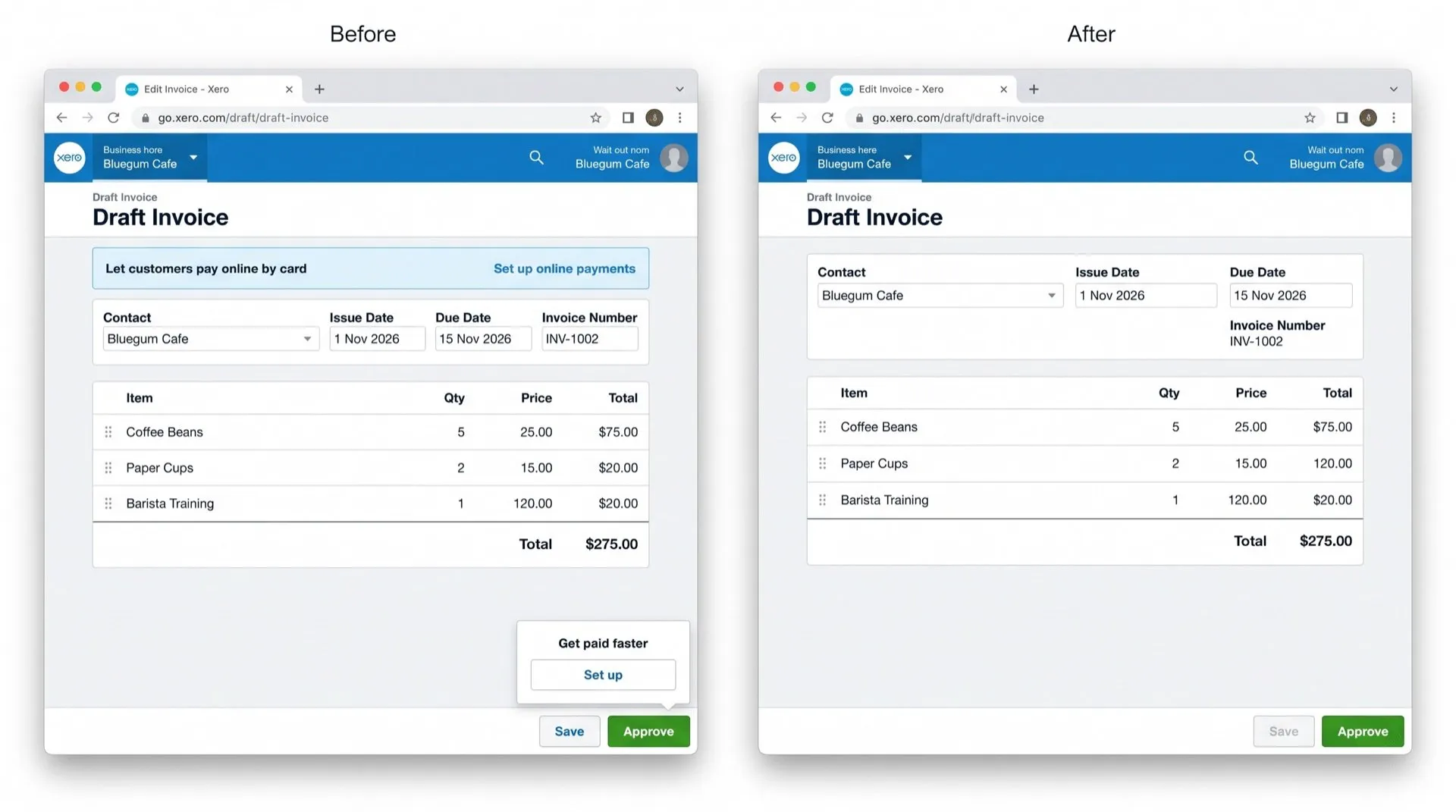
In the invoice editor, Xero shows a box and a banner inviting you to set up online payments. The prompt appears where the Approve button usually is, so muscle memory sends you into the payments setup instead. Then you have to back out.
Can you turn it off in Xero?
Partly. You can dismiss the banner for good, but we found no way to turn online payments off for your organisation.
What you can do:
- On the online payments banner, choose Dismiss. It stays away after that.
- If you do use online payments, you can choose which payment options apply on each invoice.
Hide it with DeclutterMe
DeclutterMe removes the online-payments setup box and banner from the invoice editor, so the space next to Approve is just Approve. It doesn’t change your payment services or branding themes. DeclutterMe never hides failed-payment warnings, tax deadlines, security alerts or outage notices.
Sources
We checked this guide against these pages on October 31, 2026.
Switch it off for good with DeclutterMe
- Hide "set up online payments" promptsRemoves the online-payments setup box and banner from the invoice editor, which sit next to Approve and get clicked by mistake.
Free for 1 fix of your choice. Nothing you read or type leaves your browser.
DeclutterMe is our product. We're not affiliated with or endorsed by the companies behind these apps.