How to hide upgrade prompts and surveys in Microsoft 365 web apps
By the DeclutterMe team · Last checked October 31, 2026
Partly. Upgrade buttons in the free web apps have no off switch; paying for Microsoft 365 is the only built-in way around them. For work and school accounts, an admin can turn off in-product surveys with a policy, but there is no setting for personal accounts. A browser extension hides both.
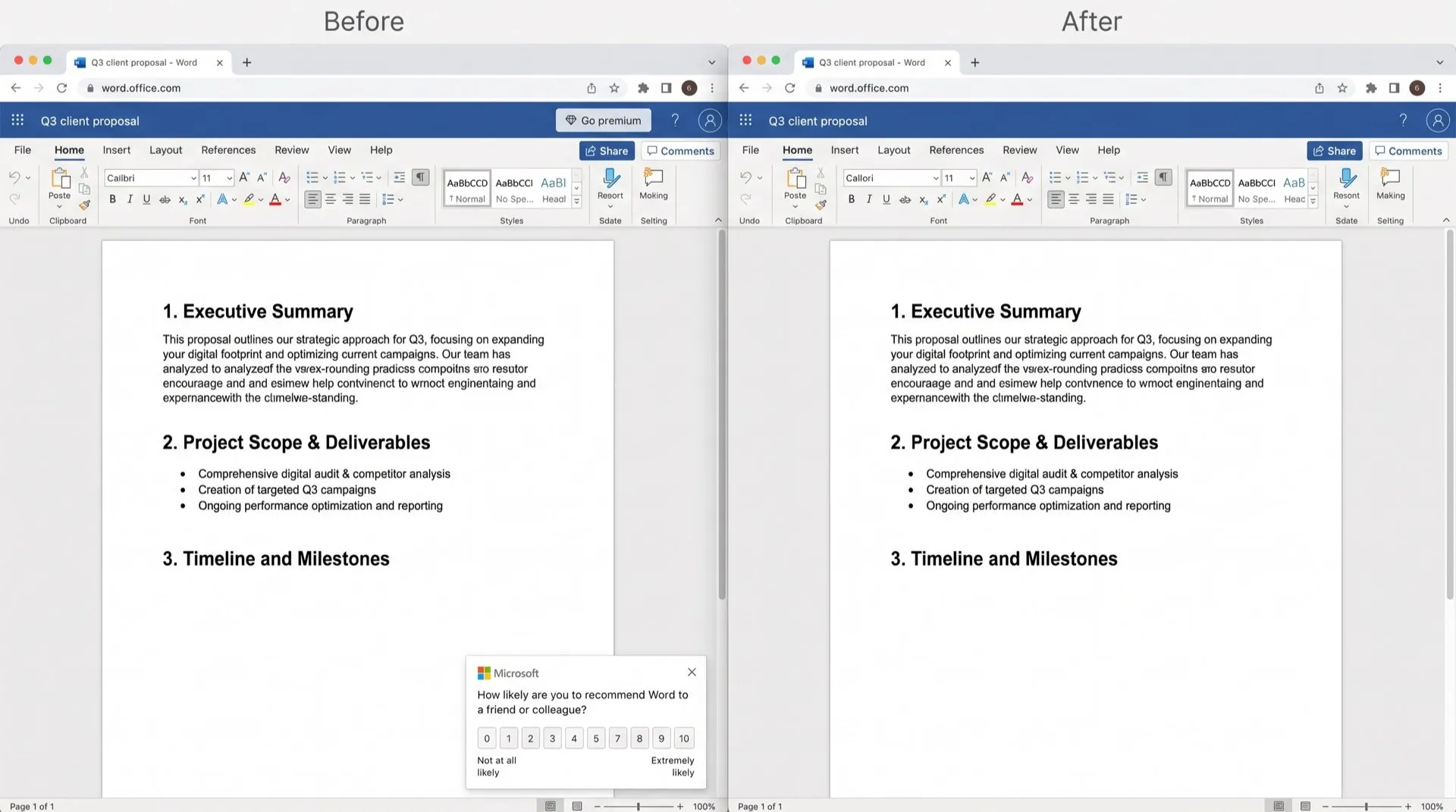
The free web versions of Word, Excel and PowerPoint work well, but they keep reminding you what you could buy. “Go premium” and “Buy Microsoft 365” buttons sit in the toolbar. Every so often, a survey asks how likely you are to recommend the app.
Where they show up
- Upgrade buttons: “Go premium”, “Upgrade” and “Buy Microsoft 365” in the header and next to premium-only features.
- Surveys: “How likely are you to recommend…” pop-ups in Word, Excel, PowerPoint and Teams.
- Tours: “What’s new” walkthroughs after an update.
Can you turn them off in Microsoft 365?
Upgrade prompts: no. There is no setting for them in the free web apps. They’re there because the account doesn’t have a Microsoft 365 subscription. Subscribers can still see “Go premium” on individual features, such as Transcribe in Word for the web.
Surveys: only with a work or school account, and only your admin can do it. Microsoft has a policy called Allow users to receive and respond to in-product surveys from Microsoft. It covers Word, Excel, PowerPoint, Teams, Outlook and other apps.
- Your admin opens Cloud Policy service for Microsoft 365.
- They search for “survey” and set that policy to Disabled for your group.
- It can take a few hours for apps to pick up the change.
What this doesn’t fix
- With a personal Microsoft account, we found no setting to stop surveys.
- The survey policy doesn’t touch upgrade buttons or “What’s new” tours.
- Closing a survey or tour only closes that one; the next one still appears.
Hide them for good
DeclutterMe removes “Go premium”, “Buy Microsoft 365” and “Upgrade” prompts from the free web apps. It also closes “How likely are you to recommend…” surveys and “What’s new” tours in Word, Excel, PowerPoint and Teams as they appear. It never hides security alerts, storage-full warnings or outage notices, so the messages you need still get through.
Sources
We checked this guide against these pages on October 31, 2026.
Switch it off for good with DeclutterMe
- Hide Microsoft 365 upgrade buttonsRemoves "Go premium", "Buy Microsoft 365" and "Upgrade" prompts from the free web apps.
- Dismiss surveys and feature toursCloses "How likely are you to recommend…" surveys and "What's new" tours in Word, Excel, PowerPoint and Teams.
Free for 1 fix of your choice. Nothing you read or type leaves your browser.
DeclutterMe is our product. We're not affiliated with or endorsed by the companies behind these apps.