How to hide Atlassian promo banners in Jira and Confluence
By the DeclutterMe team · Last checked October 31, 2026
Partly. You can close each banner, and site admins can ask Atlassian support to opt the site out of some promotions. No setting turns them all off. An extension can hide Atlassian's marketing banners while leaving your admins' announcements and outage notices in place.
Across the top of a Jira board or a Confluence page, a banner asks you to try a Premium plan. Or it tells you about Atlassian’s latest product news. It pushes your work down the page, and closing it doesn’t mean you’ve seen the last of it.
Where the banners come from
- Trial offers, such as invitations to try Jira or Confluence Premium for free.
- Product announcements from Atlassian, such as its notice that it is renaming “products” to “apps”.
- Wide promotional banners at the top of a page.
These are different from the banners your own admins post. Announcements, maintenance notices and outage alerts come from your company or from Atlassian’s status system, and they matter.
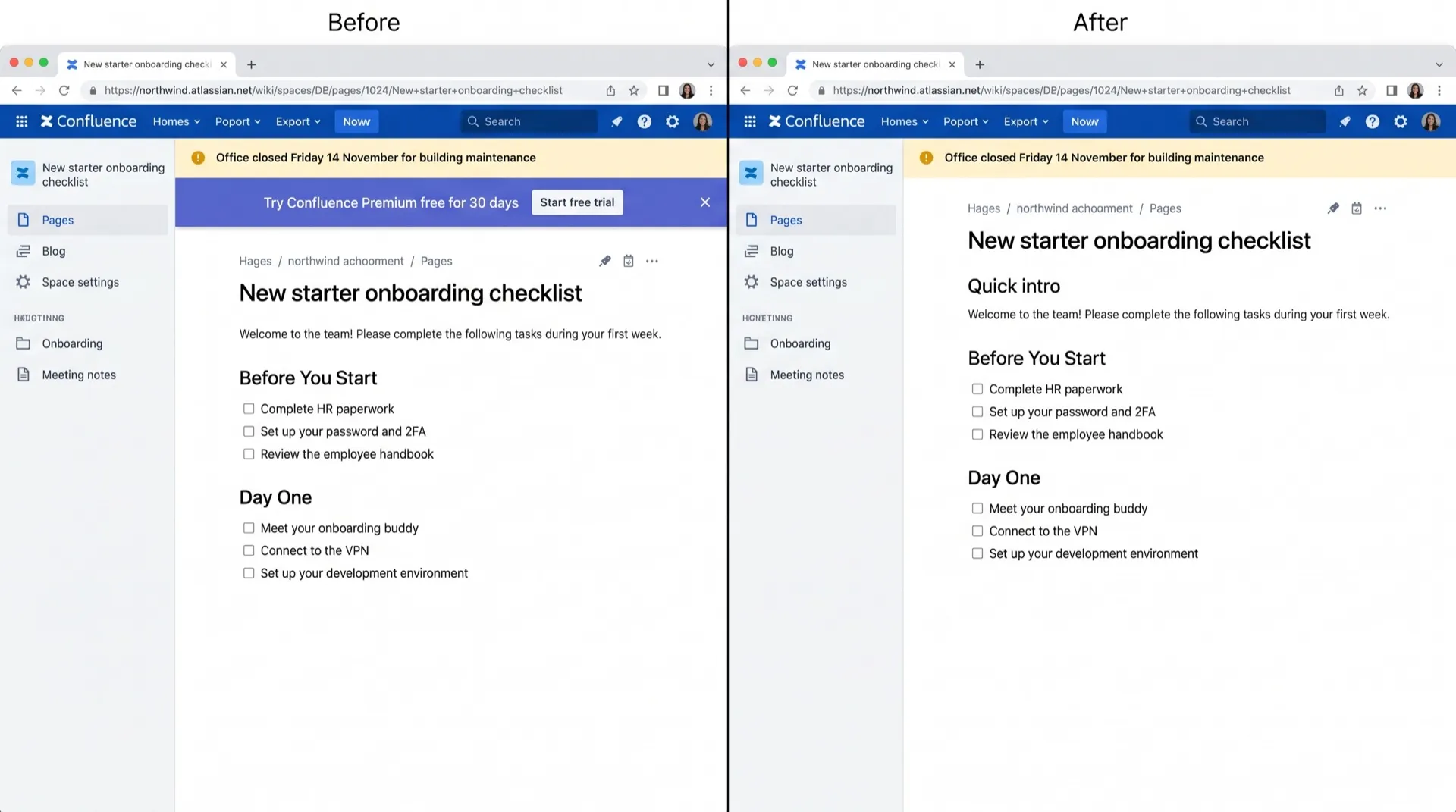
Can you turn them off in Jira or Confluence?
Not with a setting. We found no admin control for these in Jira or Confluence.
What you can do:
- Click the X on the banner to close it. That hides that one banner, for you.
- If you’re a site admin, open a support request with Atlassian and ask to opt your site out of promotional messages. This can cover wide banner promotions, full-screen promotional pop-ups and some other promotional surfaces, but not always all of them.
New campaigns can still appear after either step.
Hide marketing, keep real notices
DeclutterMe removes Atlassian’s own marketing banners in Jira and Confluence. Your admins’ announcements and outage notices always stay visible, even when they mention plans or upgrades. A message like “We’re moving to Premium on Friday” still reaches you.
Switch it off for good with DeclutterMe
- Hide Atlassian promo bannersRemoves Atlassian's own marketing banners. Your admins' announcements and outage notices always stay.
Free for 1 fix of your choice. Nothing you read or type leaves your browser.
DeclutterMe is our product. We're not affiliated with or endorsed by the companies behind these apps.