How to hide Google Workspace security upsells in Gmail
By the DeclutterMe team · Last checked October 31, 2026
We found no Gmail or Google Workspace admin setting that turns off these upgrade offers. Admin controls cover real spam and phishing warnings, not promotions. A browser extension can hide the offers while leaving genuine security warnings alone.
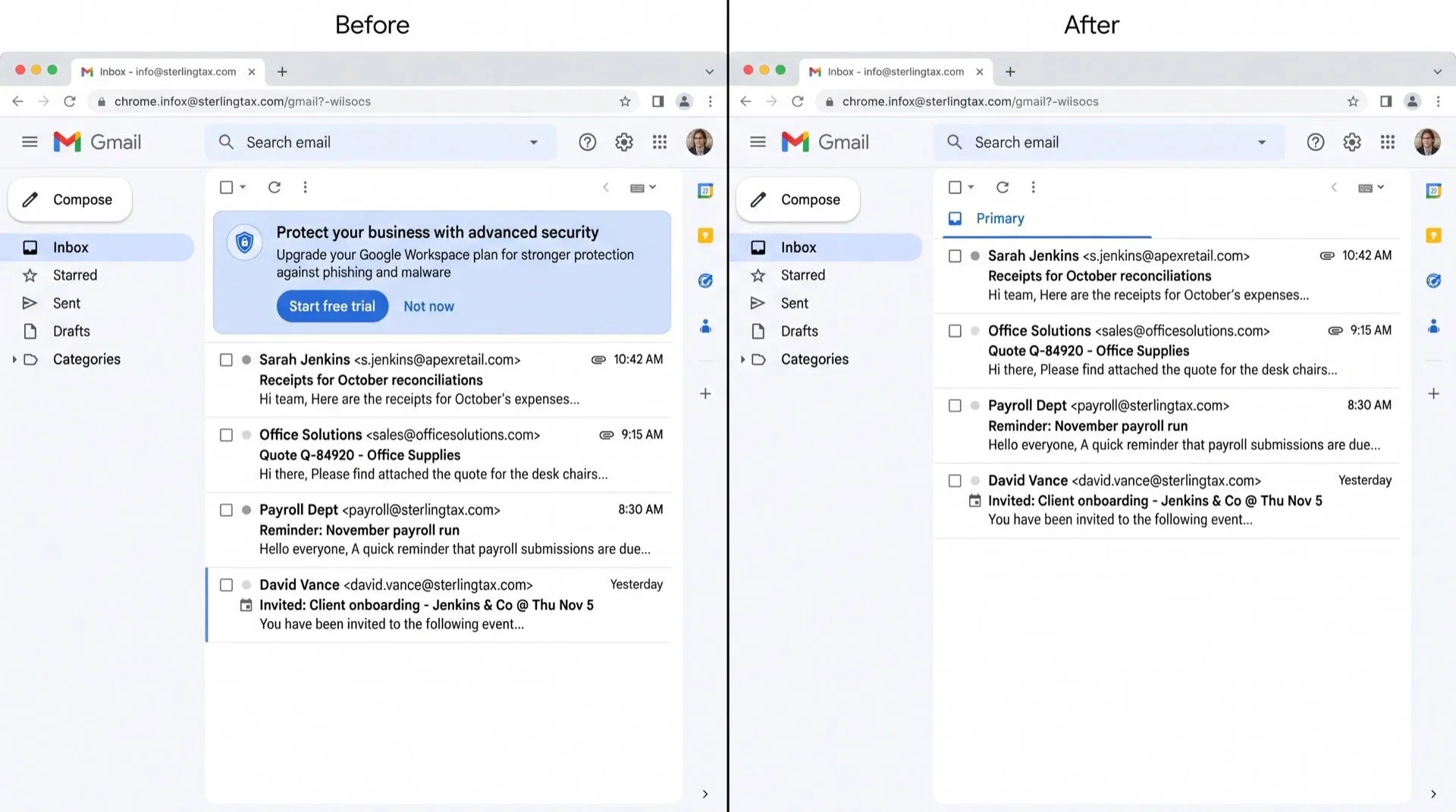
Above your inbox, Gmail sometimes shows a box suggesting you upgrade to Google Workspace to protect your account or your business. It looks like a security message, which makes it hard to tell apart from the warnings you should act on.
Where they show up
These offers appear as a banner or box at the top of the Gmail inbox. They mention Google Workspace together with words like security, protect or upgrade, and link to a plan or a trial.
Can you turn them off in Gmail?
No. We found no setting in Gmail, and no option in the Google Workspace Admin console, that turns off these offers.
What admins can control is different:
- Gmail warning banners: admins can turn spam and phishing warning banners on or off. Those are real security warnings about specific emails, not upgrade offers.
- Communication preferences: admins can choose which product and offer emails Google sends to their organisation. Google’s help page only describes emails, not boxes inside Gmail.
If an offer has a close button you can dismiss it, but we couldn’t confirm how long it stays away.
Tell offers and real warnings apart
A real Gmail warning is about a specific email or your account: a suspicious message, a blocked sign-in, a password problem. An upsell talks about a product or a plan and invites you to start a trial. If you’re unsure, check your account at myaccount.google.com rather than clicking the box.
Hide the offers, keep the warnings
DeclutterMe removes the “upgrade your security” Google Workspace prompts above the inbox. It never hides security alerts, storage-full warnings or outage notices, so a genuine warning about your account or a suspicious email still shows up.
Sources
We checked this guide against these pages on October 31, 2026.
Switch it off for good with DeclutterMe
- Hide Workspace security upsellsRemoves the "upgrade your security" Google Workspace prompts above the inbox.
Free for 1 fix of your choice. Nothing you read or type leaves your browser.
DeclutterMe is our product. We're not affiliated with or endorsed by the companies behind these apps.