How to turn off Copilot in Outlook on the web
By the DeclutterMe team · Last checked October 31, 2026
Partly. With a personal Microsoft account, Outlook on the web has a "Turn on Copilot" switch under Settings > Copilot. It isn't available for work or school accounts. A browser extension can hide the Copilot buttons and pop-ups either way.
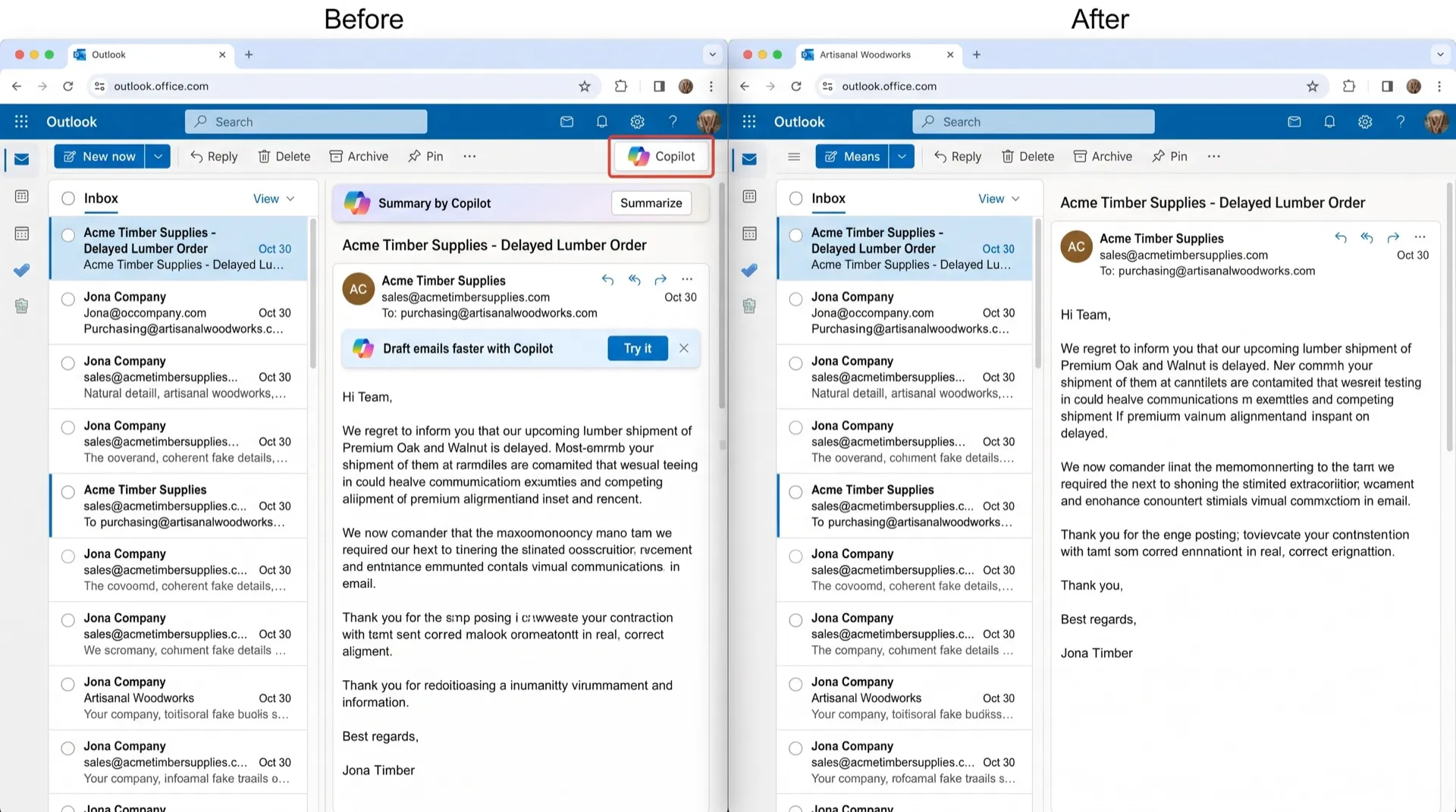
Copilot now appears all over Outlook. There’s a button in the toolbar, offers to summarise a thread or draft a reply, and pop-ups inviting you to try it. If you’d rather read and write your own email, it’s a lot of extra buttons.
Where Copilot shows up
- The toolbar and message view: Copilot buttons, including summarise and draft options.
- When you write: Copilot drafting suggestions in new emails.
- Promo pop-ups: callouts inviting you to try Copilot.
Can you turn it off in Outlook?
Yes, if you use a personal Microsoft account. Outlook has its own switch, separate from Word and Excel.
- In Outlook on the web, click the gear icon to open Settings.
- Select Copilot.
- Switch off Turn on Copilot and save.
Microsoft says this choice applies to Outlook on all your devices where you’re signed in with the same account. In the new Outlook for Windows the switch is in the same place; on Mac, iPhone and Android it’s under Quick Settings > Copilot.
What this doesn’t fix
- Microsoft says this setting isn’t available with a work or school account. There, your IT admin decides whether Copilot appears.
- Classic Outlook for Windows doesn’t have the switch yet.
The privacy-setting workaround
Turning off “experiences that analyze your content” in your Microsoft privacy settings also disables Copilot. But it switches off other features too, such as suggested replies in Outlook and text predictions in Word.
Hide Copilot in your browser
DeclutterMe removes Copilot buttons in Outlook on the web and closes Copilot promo pop-ups as they appear. It works whether or not you have the setting, and it doesn’t touch your other Outlook features. Switch it back on any time from the extension.
Sources
We checked this guide against these pages on October 31, 2026.
Switch it off for good with DeclutterMe
- Hide CopilotRemoves Copilot buttons and closes Copilot promo popups.
Free for 1 fix of your choice. Nothing you read or type leaves your browser.
DeclutterMe is our product. We're not affiliated with or endorsed by the companies behind these apps.